28 May 2025
Azure’s Model Router: Smarter AI, Lower Costs for Your Business
Also published on LinkedIn
Businesses can now reduce their AI costs without sacrificing quality. Microsoft’s new Model Router (currently in preview) is an Azure OpenAI Service feature that acts like an intelligent traffic controller for AI models. Instead of always using the most powerful (and expensive) large language model (LLM) for every task, the Model Router automatically directs each request to the most cost-effective model that can handle it – balancing performance and price while maintaining high quality[[2]](https://www.linkedin.com/redir/redirect?url=https%3A%2F%2Flearn%2Emicrosoft%2Ecom%2Fen-us%2Fazure%2Fai-services%2Fopenai%2Fconcepts%2Fmodel-router&urlhash=ZLWZ&trk=article-ssr-frontend-pulse_little-text-block)[[1]](https://www.linkedin.com/redir/redirect?url=https%3A%2F%2Fgithub%2Ecom%2Fguygregory%2FModelRouter&urlhash=CMrH&trk=article-ssr-frontend-pulse_little-text-block). In short: smarter routing, lower costs, and the same great results.
What is the Model Router?
The Model Router is a smart AI “middleman” that evaluates your users’ queries in real time and chooses the best underlying model to respond[[1]](https://www.linkedin.com/redir/redirect?url=https%3A%2F%2Fgithub%2Ecom%2Fguygregory%2FModelRouter&urlhash=CMrH&trk=article-ssr-frontend-pulse_little-text-block). By assessing factors like prompt complexity, required tools, and performance needs, it decides if a smaller, cheaper model is sufficient or if a more powerful model is required[[2]](https://www.linkedin.com/redir/redirect?url=https%3A%2F%2Flearn%2Emicrosoft%2Ecom%2Fen-us%2Fazure%2Fai-services%2Fopenai%2Fconcepts%2Fmodel-router&urlhash=ZLWZ&trk=article-ssr-frontend-pulse_little-text-block)[[1]](https://www.linkedin.com/redir/redirect?url=https%3A%2F%2Fgithub%2Ecom%2Fguygregory%2FModelRouter&urlhash=CMrH&trk=article-ssr-frontend-pulse_little-text-block). This ensures simpler queries use lightweight models (saving money) while complex questions automatically get the advanced AI brainpower they need. All of this happens behind a single unified endpoint, so your team doesn’t have to manually pick or swap models – integration stays simple[[2]](https://www.linkedin.com/redir/redirect?url=https%3A%2F%2Flearn%2Emicrosoft%2Ecom%2Fen-us%2Fazure%2Fai-services%2Fopenai%2Fconcepts%2Fmodel-router&urlhash=ZLWZ&trk=article-ssr-frontend-pulse_little-text-block).
How It Works under the hood: Three Easy Steps
Using the Model Router in Azure OpenAI is straightforward. Here’s how a request flows through the system:
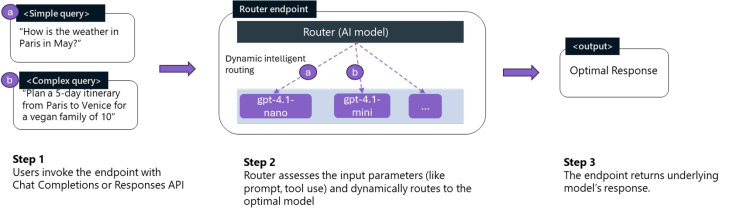
Screenshot taken from Microsoft Build 2025 - Breakout session BRK 178 [4]
- Step 1 – Invoke the Endpoint: Your application or user sends a prompt to the Model Router endpoint via the standard Azure OpenAI Chat Completions (or Completions) API. This is just like making any other query to an AI model, so no special new code is needed on your side.
- Step 2 – Intelligent Routing: The Model Router analyzes the request – looking at the prompt and context (including any tool use or complexity in the query) – and dynamically routes it to the optimal model for a response[[1]](https://www.linkedin.com/redir/redirect?url=https%3A%2F%2Fgithub%2Ecom%2Fguygregory%2FModelRouter&urlhash=CMrH&trk=article-ssr-frontend-pulse_little-text-block). In milliseconds, it chooses the model that will give the best balance of speed, cost, and quality for that particular prompt.
- Step 3 – Response Returned: The chosen AI model generates an answer. The Model Router then returns the model’s response back through the same endpoint. From your perspective, you simply get a high-quality answer, without needing to know which model was used under the hood.
The screenshot above was taken from Build 2025 which I really recommend you have a look at the first 15 minutes of, if you are curious how it works? The session breaks it down beautifully in my opinion[[4]](https://www.youtube.com/watch?v=N6SYd1y3e4g&trk=article-ssr-frontend-pulse_little-text-block).
Business Benefits of Model Router
- Lower AI Usage Costs: By automatically using smaller-capacity models for easy tasks and only calling on big models when absolutely needed, Model Router saves your business money on AI compute costs[[1]](https://www.linkedin.com/redir/redirect?url=https%3A%2F%2Fgithub%2Ecom%2Fguygregory%2FModelRouter&urlhash=CMrH&trk=article-ssr-frontend-pulse_little-text-block). You’re no longer overpaying for top-tier model performance when it’s not necessary.
- Maintained Quality and Performance: Even with cost savings, you won’t compromise on results. For complex queries or critical tasks, the router taps into powerful models to ensure high-quality, accurate responses[[1]](https://www.linkedin.com/redir/redirect?url=https%3A%2F%2Fgithub%2Ecom%2Fguygregory%2FModelRouter&urlhash=CMrH&trk=article-ssr-frontend-pulse_little-text-block). Your end-users continue to get fast, great answers – and simple questions may even get answered faster by the leaner models.
- Simplicity and Scalability: The Model Router provides a single AI endpoint that handles all the decision-making for you[[2]](https://www.linkedin.com/redir/redirect?url=https%3A%2F%2Flearn%2Emicrosoft%2Ecom%2Fen-us%2Fazure%2Fai-services%2Fopenai%2Fconcepts%2Fmodel-router&urlhash=ZLWZ&trk=article-ssr-frontend-pulse_little-text-block). This means less complexity for your developers and easier scaling of AI-driven applications. As your usage grows or your queries vary in difficulty, the system adapts automatically. You don’t need a data scientist tweaking when to use Model A or B – Azure handles it in real time.
- Optimized AI Investment: Whether you’re experimenting with new AI-powered features or scaling up a customer-facing application, the Model Router helps you get more value from your AI budget. It ensures you’re always using the “right-size” model for each job, maximizing efficiency. In the words of Microsoft’s Azure team, this capability is a “game-changer for apps that need adaptive intelligence.”[[3]](https://www.linkedin.com/redir/redirect?url=https%3A%2F%2Ftechcommunity%2Emicrosoft%2Ecom%2Fblog%2Faiplatformblog%2Fazure-ai-foundry-models-futureproof-your-genai-applications%2F4414904&urlhash=8xh4&trk=article-ssr-frontend-pulse_little-text-block)
Why It Matters for You
For business leaders, the bottom line is simple: Model Router cuts costs and boosts efficiency. Imagine running a company FAQ chatbot or a document analysis tool – many user questions are basic and can be handled by a smaller AI model. Occasionally, a complex request comes along that needs the big guns. Model Router handles this automatically, so you’re not paying premium prices all the time, only when it’s truly beneficial. It enables you to offer AI-driven services to customers or employees at scale, with predictable and optimized costs.
In summary, Azure’s Model Router enables smarter AI usage that aligns with business goals: minimize expenses while delivering excellent results. It’s one of the latest innovations from Microsoft Azure’s AI services aiming to help organizations leverage artificial intelligence in a cost-effective way[[2]](https://www.linkedin.com/redir/redirect?url=https%3A%2F%2Flearn%2Emicrosoft%2Ecom%2Fen-us%2Fazure%2Fai-services%2Fopenai%2Fconcepts%2Fmodel-router&urlhash=ZLWZ&trk=article-ssr-frontend-pulse_little-text-block). Since it’s currently in preview, now is a great time to explore how Model Router can benefit your projects. By adopting features like this, businesses can stay ahead in the AI era – enjoying cutting-edge capabilities without breaking the bank.[[2]](https://www.linkedin.com/redir/redirect?url=https%3A%2F%2Flearn%2Emicrosoft%2Ecom%2Fen-us%2Fazure%2Fai-services%2Fopenai%2Fconcepts%2Fmodel-router&urlhash=ZLWZ&trk=article-ssr-frontend-pulse_little-text-block)[[1]](https://www.linkedin.com/redir/redirect?url=https%3A%2F%2Fgithub%2Ecom%2Fguygregory%2FModelRouter&urlhash=CMrH&trk=article-ssr-frontend-pulse_little-text-block)
References
[1] Model Router for Azure OpenAI - GitHub
[2] Model router for Azure AI Foundry (preview) concepts - Azure OpenAI
[3] Azure AI Foundry Models: Futureproof Your GenAI Applications
[4] Optimize your GenAI applications at scale in Azure AI Foundry | BRK178 - YouTube