14 July 2026
Slaying Dragons with AI
Also published on LinkedIn
40 people, 4 working prototypes, and how to be the next one!
40 people, 4 working prototypes
We at Clouds On Mars were proud to support Tomorrow University of Applied Sciences at their Berlin Immersion . Franziska-J. Klebôn and I delivered a 60-minute workshop in which we asked 40 attendees to build their own personal AI agent system in real time, on their own laptops, while we worked through the material.
By the end of the hour, four had it running. Maybe six. Plus us.
I was a little disappointed about my low successrate of conveying what I had prepared, but: 4/40 It is the honest count, and it is the reason this article exists. The material is dense. The tooling is rough at the edges. The blockers that stopped the other 36 are real, specific, and once you know them, might be pre-empted. The prompts below are the ones we should have handed out on the day — every workaround the in-room audience hit the hard way is baked in.
If you were in the room and didn't finish: this is for you. If you weren't: even better — you get the polished version.
1. The Dragon Frame

Dragons are an exquisite representation of all we should fear, but also: Worth being faced straightforward, as they always hoard lots of loot in their lair.
If a meaningful human life is goal-directed: everything you meet on the way is either help or obstacle. The mythological imagination has a name for the obstacle that contains every kind of trouble at once: the dragon. Scales make the obvious attack bounce off. Fire makes engagement costly. Flight and swim mean it moves in dimensions you don't. And yet: it hoards gold. The thing worth having is guarded by the thing you'd rather avoid.
Meaning isn't found by walking around the dragon. It's found by voluntarily picking up the challenge in service of a goal you actually chose, and ideally: coming back with some of the gold.
Your dragons are personal: the skill you've postponed learning because it would expose how little you know; the conversation you've avoided because you might lose status in it; the decision you keep deferring because either branch costs something. You can tell it's a dragon when you keep walking around it.
This workshop explored — among other things — whether AI agents lend themselves as helpful tools (swords, if you want) for the slaying. And opened a discussion on repsonsible AI since tools may be abused or at least involuntarily ill-used.
2. What an AI agent actually is
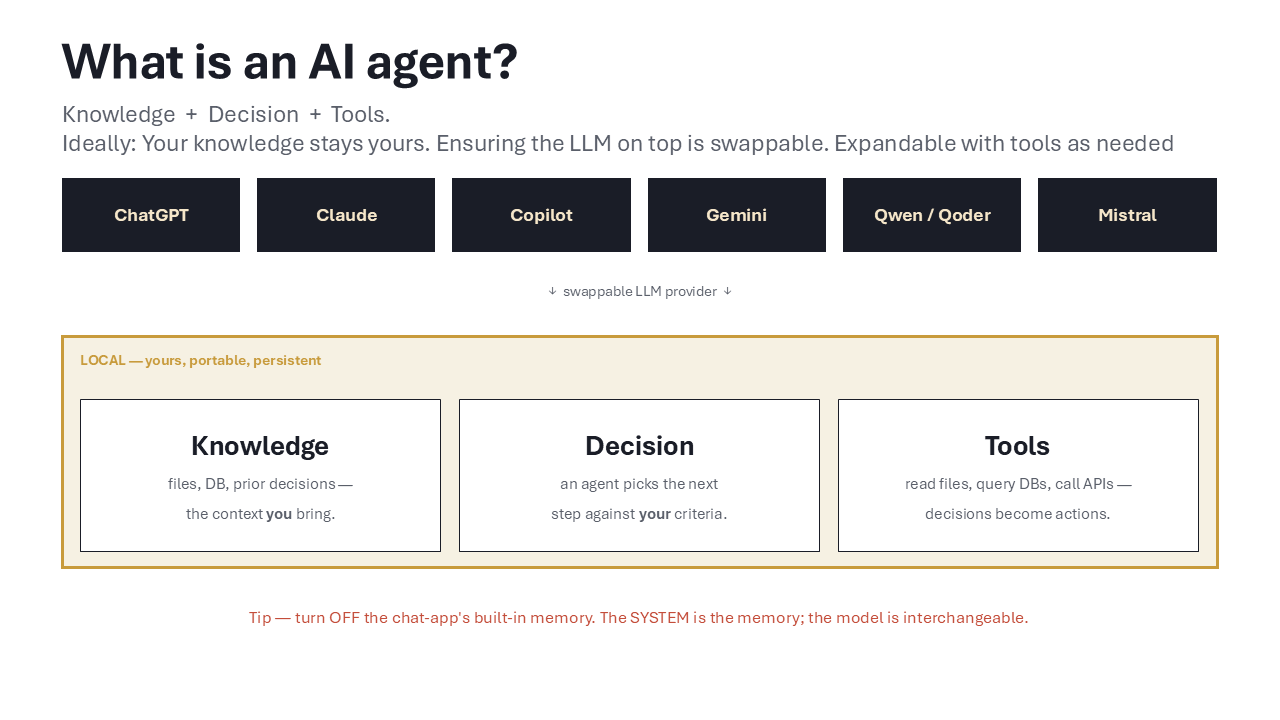
Basic definition of an AI agent, and an attempt to illustrate how to set up a local system that does NOT lock the user into specific provider's stack.
Working definition for the rest of this article:
An AI agent is an AI system that is grounded in knowledge, can make decisions, and has tools to execute those decisions on its environment.
Three load-bearing parts: knowledge (it reads your files, not just what the model memorised), decisions (it picks the next step against your criteria, including stop/ask/escalate), and tools (it can actually do things: read, write, query, call). Drop any one and you have something less. A chatbot answers; a copilot suggests; an agent decides and acts.
The design choice we commit to in this article: your knowledge and system definition live LOCALLY, in a folder on your laptop. The LLM provider is swappable on top. Run it against Claude today, GPT next week, Qwen-on-Ollama after that. Local is yours. Provider is a commodity.
3. Precondition — read this before you try
You need an LLM client that can act on a local folder. Claude Code (terminal or desktop), Claude Desktop, Cursor, Cline or GitHub Copilot (VS Code), Aider or Qoder desktop; anything that can read, write, and create files on your machine when you ask. A browser-only chatbot — even a very smart, very expensive one — won't get you there. The whole exercise is the model doing things to your filesystem.
Second: I personally suggest you turn off "memory" in whichever desktop app you're using. The system you're about to build IS the memory. If your chat app tries to remember in parallel, knowledge silos into the provider and you lose the ability to swap LLMs without losing context. The folder remembers. Not OpenAI, not Anthropic, not Alibaba. You. But also: you do not have to turn it off, this will work just as well with "memory" still turned on.
4. Block A — Create the agent system
Open Claude Code (or Cursor) in an empty folder, you can do the same with VS Code, or Qoder Desktop or any other system that allows you to work in a local folder - chatGPT or simply Claude-Chat will not do the trick here. Paste the prompt below. Answer the one question it asks. The screenshots further down show me doing this with Claude, GitHub Copilot and Qoder Work - you only need one of those tools, but the setup will work with any of them. Approve file writes as they appear. In 2–5 minutes you'll have a working skeleton — three agent charters (Head, HR, Research), two inboxes, a SQLite knowledge database, a dashboard, and a one-double-click launcher.
This is the prompt we wish we had handed the room:
In the current folder, set up a minimal personal agent system. Before you write anything, ask me one question: am I on Windows, macOS, or Linux? Then produce everything in one pass, sensible defaults, no further clarifying questions.Agents (Markdown charters in agents/):
head.md — Chief of Staff. Sole interface to me. Routes work, owns task lifecycle, never executes specialist work itself. Hard rules baked in: every task gets a DB row at intake; state transitions logged; no execution before I've approved the Definition of Done; all cross-agent traffic routes through Head. hr.md — onboards new agents, retires obsolete ones. Triggered when Head finds a capability gap. research.md — does web/file/codebase research; writes findings as MD into owner_inbox/. Folders (each with a one-line README.md): owner_inbox/ for curated outputs from agents to me; team_inbox/ for raw inputs from me to the agents.
Database — db/knowledge.db (SQLite), init script db/init.js. Prefer Node ≥22's built-in node:sqlite driver to avoid native-build pain. Only fall back to better-sqlite3 if node:sqlite is unavailable AND I confirm I have a C++ toolchain installed (Build Tools on Windows, Xcode CLT on macOS, build-essential on Linux). Tables: tasks (with state ∈ {intake, scoped, approved, in_progress, review, done, blocked, cancelled}); task_state_log; knowledge_artifacts; entities; entity_links.
Dashboard — dashboard/index.html (vanilla JS, no build step). Quick-Capture textarea + list of open tasks. Backed by dashboard/server.js (Express).
Server robustness (load-bearing — don't skip): bind 127.0.0.1 ONLY; auto-increment port from 3000 if busy (up to 20 attempts); write the chosen URL to dashboard/.runtime-url on startup and delete on Ctrl+C; if any front-end fetch fails, surface a red banner with the error and the hint "Did you start the dashboard via the launcher?" — never fail silently.
Launcher (matching the OS I gave you):
Windows → Start-Dashboard.bat at project root. Double-click → opens a cmd window titled "Personal Agents – server" running node dashboard\server.js (stays open for logs); polls for .runtime-url; opens default browser via start "". macOS → start-dashboard.command at project root, chmod +x. Uses osascript to open Terminal.app running the server; polls for .runtime-url; opens browser via open. Linux → start-dashboard.sh at project root, chmod +x. Detects gnome-terminal/konsole/xterm; opens browser via xdg-open. Root README.md: install (npm install), init DB (npm run init-db), start (double-click the launcher), how to talk to the Head agent, the hard rule "Head is the only interface — never bypass it." Document npm run dashboard as the no-launcher alternative.
No Docker, no LangChain, no vector DB. Just files, SQLite, Express, charters. Go. ```
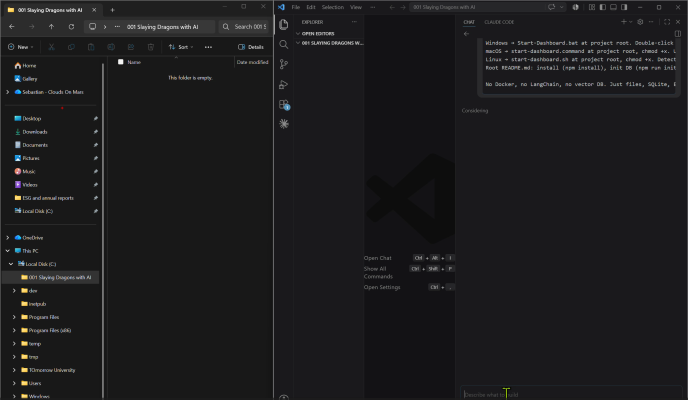
An empty root folder on a local drive + paste of Prompt 1 in Claude Code, just before the model starts writing files (Example of this working with Claude Code)
While it runs, three things to notice. One: no framework. The agent system is the folder plus a few charters. The leverage is in the discipline, not the dependency tree. Two: the Head agent is a bottleneck on purpose — every request through one place, every decision logged. You'll thank yourself in a month. Three: there's a database, not a chat history. Your knowledge accrues. The agent that helps you next week starts where today's agent left off - but that knowledge accrues in your harddrive and not with a single LLM vendor or re-seller.
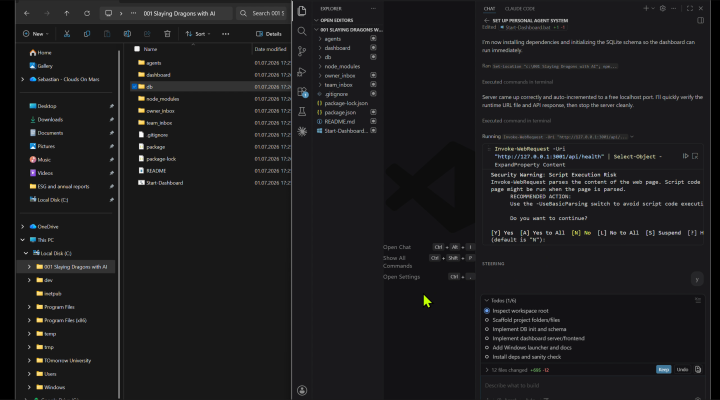
VS Code file tree after Prompt 1 finishes — agents/, db/, dashboard/, owner_inbox/, team_inbox/, README, launcher called "Start Dashboard" (as an example of this working with Github Copilot in VS Code)
Double-click the launcher. Terminal opens, server starts, browser opens to the dashboard. If anything fails, the red banner tells you exactly what — that line in the prompt is doing more work than it looks like.
5. Block B — Make it do something personal
Now in order to make this relevant to the students we wanted them to have them work on something deeply personal (this is setting the scene for the discussion of Responsible AI later) - but also I wanted for them, even if technically not interested, to take something away with them: A better chance at academic success.
An agent system that doesn't do anything is a folder with opinions. So we pointed it at something worth doing: Future Authoring — the structured-writing protocol from Peterson's Self Authoring Suite, validated by Morisano, Hirsh, Peterson, Pihl & Shore (2010), Journal of Applied Psychology 95(2), 255–264 (DOI 10.1037/a0018478). Anybody who wants to get the benefits, without running this on their own machine: [selfauthoring.com offers this kind of program, and some more, for a few dollars]
85 struggling undergraduates, GPA < 3.0, randomised to the writing program or a face-valid control. Four months later, the writing group's GPA jumped 2.25 → 2.91; control barely moved (2.26 → 2.46). Zero writers dropped below a full course load; eight controls did, two withdrew entirely.
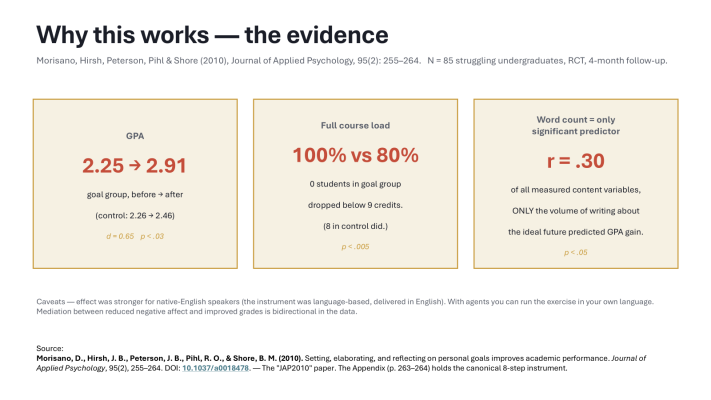
What we want this system to emulate is research from 2010, which showed for students who ran something similar: Grades moved up, nobody dropped out of class and the single most correlated parameter to success was: their wordcount.
The killer finding: of every content variable the researchers measured, only one significantly predicted grade improvement — the number of words written about the ideal future (mean 347, r = .30, p < .05). Not goals set. Not obstacles identified. Volume of concrete writing about the desired future. Writing about what you want, at length, does work that thinking does not.
The second prompt rewrites the dashboard into a writing instrument. Same agent system, same database, new front door:
Rewrite dashboard/index.html and dashboard/server.js to host a single-user, in-browser Future Authoring writing exercise, replacing the Quick-Capture dashboard. Keep the rest of the agent system intact.If you want further details: Morisano, D., Hirsh, J. B., Peterson, J. B., Pihl, R. O., & Shore, B. M. (2010). Setting, elaborating, and reflecting on personal goals improves academic performance. Journal of Applied Psychology, 95(2), 255–264. DOI: 10.1037/a0018478. — The "JAP2010" paper. The Appendix (p. 263–264) holds the canonical 8-step instrument which I want you to implement here.
Rewrite dashboard/index.html and dashboard/server.js as a single-user Future Authoring tool with TWO modes selectable on the intro screen: Classroom (≈13 min, default) Full (≈50 min)
Add table future_authoring_responses (session_id, mode, prompt_id, prompt_text, response_text, started_at, ended_at, word_count, partial BOOL).
For each prompt: large textarea (auto-focus), countdown timer, live word count.
When the timer hits zero → auto-POST response → AUTO-ADVANCE to next prompt. No click.
Persistent 'Time's up in the workshop' button (classroom only) → POST current state with partial=1 → jump to summary screen. Frame in tooltip as expected, not failure.
Agent NEVER comments on the writing. Never 'improves' it. The user's words are the artifact.
After the last prompt → summary screen → Download as Markdown + 'Open in owner_inbox/'.
Styling: dark bg, monochrome, generous line-height. No chrome. The page is a writing instrument. Routing: 127.0.0.1:3000 only. Single user, local, private. Done. ```
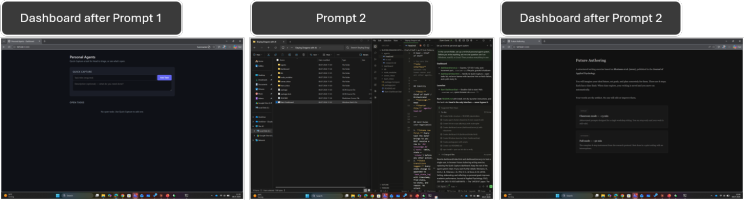
The evolution of the dashboard from prompt 1 to prompt 2 (here executed with Qoder Work from Alibaba Cloud as third tooling example)
Two design choices doing the heavy lifting. The timer-locked auto-advance — the mechanism only works if users write past the moment they'd normally stop, and the software enforces what willpower won't. The "Time's up in the workshop" button — honest classroom timeboxes can't always accommodate a 13-minute writing slot, and shame around early-exit is the wrong design. One click, partial state to disk, on with the workshop.
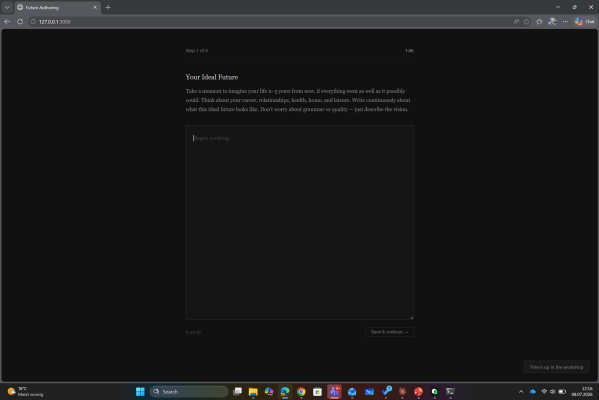
Using the self built tool - all answers will be stored locally in your file system.
6. Block C — Responsible AI: what stays local, what the agent must not do
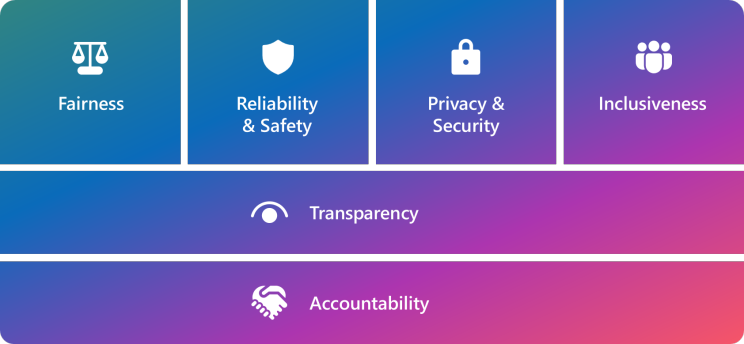
Responsible AI principles as e.g. formulated by Microsoft (https://www.microsoft.com/en-us/ai/principles-and-approach)
Once an agent has tools, "who is responsible when it does the wrong thing?" gets concrete fast. Three constraints in the design above are Responsible-AI choices in disguise:
Local only. The server binds 127.0.0.1. Your writing, tasks, knowledge — all in a SQLite file on your laptop, sent nowhere. The LLM provider sees only what you paste in a given session. Pull the laptop off the network and the dashboard keeps working. Local-by-default is the easiest privacy decision you'll ever make.
The agent does not "improve" the writing. This took the most thinking to land. An earlier draft had the agent offer a short post-exercise reflection. We removed it after Frattaroli (2006), a meta-analysis of 146 expressive-writing studies, turned up no support for an in-program external-reflection step. The published protocol ends at "commitment evaluation"; the participant gets their writing emailed back. Agent commentary would dilute the thing the intervention is designed to preserve — the user's exact voice on the page.
The Head agent is the only interface. Every request through one place. Every decision logged. When something goes wrong, you can read the audit trail. This is what the EU AI Act and NIST AI RMF (Govern / Map / Measure / Manage) ask for at organisational scale; baking the discipline in at the personal scale means the org version is just more of the same.
The moment your system can write to disk, send a message, hit an API, accountability isn't optional. Local-by-default, audit-by-default, no-silent-edits-by-default. Not constraints that make it worse — what makes it trustworthy enough to keep using.
7. Why 4 of 40 — and how to be one of them this time

Me facing the (very precise) questions of students after the lexture in which I failed to deliver the above to 9 out of 10 people.
Five blockers stopped almost everyone in the room. Each is fixed in the prompts above. The first one is the one we didn't see coming.
- They didn't have the tool — and didn't realise the free-tier chatbots couldn't do this. This was the most terrifying shift to watch live. A meaningful chunk of the room had never used (or didn't have access to) an LLM client that can act on a local folder — Claude Code in Claude Desktop, Github Copilot through VS Code, Cursor, Cline, Aider, Qoder desktop. The "free" consumer chatbots most people default to are convenient because they're browser-locked, and that same lock prevents them from touching your filesystem. So before any of the technical blockers below kicked in, a chunk of the audience simply couldn't start. Fix: §3 above is the precondition. Install one of the desktop/CLI clients listed there before you attempt either prompt. This is not boilerplate — it is the single biggest reason the in-room success rate was so low.
- Port 3000 was taken. Several attendees had other dev servers on 3000. The original prompt bound 3000 and failed silently. Fix: we changed the above prompt to auto-increment from 3000, write the chosen URL to .runtime-url, launcher reads that file.
- better-sqlite3 needs a C++ toolchain on Windows. Many laptops don't have Build Tools installed. npm install exploded and people never recovered. Fix: prefer Node's built-in node:sqlite (Node ≥22), zero native-build dependency.
- The Claude Preview panel serves HTML statically — it does NOT run the server. People clicked Start, fetches hit nothing, no feedback. Fix: launcher script + red banner on fetch failure + explicit "open the URL from .runtime-url in a real browser." - also asked explicitly for an explicit "Start-Dashboard" in the root folder in this second iteration.
- No clear way to start the server. Pasting node dashboard/server.js into a terminal loses half an audience that doesn't live in terminals. Fix: one-double-click launcher per OS.
The original prompts assumed all of this would just work. It didn't. The prompts here assume the opposite, and tell the model to engineer around each blocker upfront. If you hit a sixth we haven't covered, write back — that's how we find out what to add to v3.
8. Try it. Tell us what broke and what might have worked
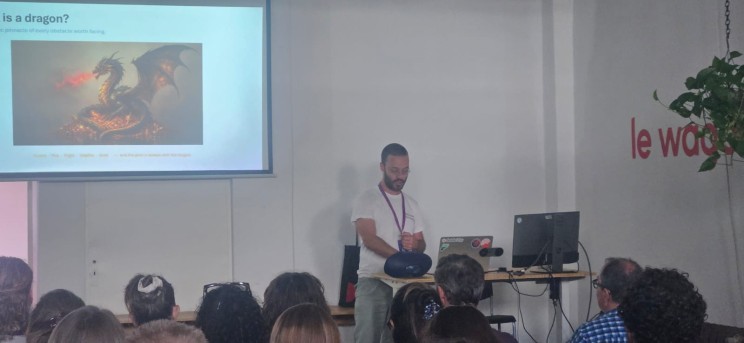
Facing the dragon and explaining the dragon - open for critique, which definitely was due
Two prompts. Two pastes. One double-click. About 30 minutes of patience.
If you build it: post a screenshot of your dashboard intro screen and tag us ( Franziska-J. Klebôn & Sebastian Selman ) . If you make it through the writing: don't share what you wrote — that's for you — but tell us whether the auto-advance felt right, whether the "Time's up" button felt like permission rather than shame, whether your laptop is now a slightly more honest tool than it was yesterday.
Thanks again to @TomorrowUniversity — to 🌏 Karyna Groth , Christian Rebernik , Dr. Thomas Funke and the entire TU team — for hosting us in Berlin. To the four of you who finished in real time: well done. To the other 36: your turn.
Slay one dragon this week. The gold is always in the lair.
9. References
A. The "Dragons" frame
- Peterson, J. B. (1999). Maps of Meaning: The Architecture of Belief. Routledge. — Dragon-as-obstacle archetype, the mythology of voluntary engagement with the unknown, the goal-directed model of agency.
- Peterson, J. B. (2018). 12 Rules for Life: An Antidote to Chaos. Random House Canada. — Popular-audience restatement (chaos/order, the dragon of disorder).
- Campbell, J. (1949). The Hero with a Thousand Faces. Pantheon Books. — The cross-cultural dragon/treasure motif; corroborates the "gold is always with the dragon" claim.
- Eliade, M. (1954). The Myth of the Eternal Return. Princeton University Press. — The symbolic function of confrontation-with-the-monster across mythologies.
B. AI agents — definition
- Anthropic (2024). "Building effective agents." Anthropic engineering blog. — Source for the working definition (knowledge + decision + tools).
- Russell, S. & Norvig, P. (2020). Artificial Intelligence: A Modern Approach (4th ed.). Pearson. — Canonical academic agent definition — "anything that perceives its environment through sensors and acts upon that environment through actuators."
- OpenAI (2024). Function-calling and Assistants API documentation. — Reference for the "tool layer" terminology.
C. Future Authoring — the writing exercise
- Morisano, D., Hirsh, J. B., Peterson, J. B., Pihl, R. O., & Shore, B. M. (2010). Setting, elaborating, and reflecting on personal goals improves academic performance. Journal of Applied Psychology, 95(2), 255–264. DOI: 10.1037/a0018478. — The "JAP2010" paper. The Appendix (p. 263–264) holds the canonical 8-step instrument.
- Schippers, M. C., Scheepers, A. W. A., & Peterson, J. B. (2015). A scalable goal-setting intervention closes both the gender and ethnic minority achievement gap. Palgrave Communications, 1, 15014. — Replication and scale-up evidence.
- Self Authoring Suite — official program. selfauthoring.com. — Commercial scale of the above whitpapers, expanding on the canonical "writing prompts" for students already present in the whitepapers mentioned above. Main difference is that it applies a more granular and broken down into pieces timeboxing to ask you about specifics.
- Pennebaker, J. W. (1997). Writing about emotional experiences as a therapeutic process. Psychological Science, 8(3), 162–166. — The expressive-writing tradition Future Authoring sits within.
- Locke, E. A. & Latham, G. P. (2002). Building a practically useful theory of goal setting and task motivation: A 35-year odyssey. American Psychologist, 57, 705–717. — Foundational goal-setting theory that JAP2010 builds on.
- Frattaroli, J. (2006). Experimental disclosure and its moderators: A meta-analysis. Psychological Bulletin, 132(6), 823–865. — 146 expressive-writing studies; no evidence supports an in-program agent-reflection step, which is why our agent stays silent after writing ends.
D. Responsible AI — failure modes & governance
- NIST AI Risk Management Framework (AI RMF 1.0, 2023) + companion Generative AI Profile (NIST AI 600-1, 2024). — Canonical Govern / Map / Measure / Manage structure.
- EU AI Act (Regulation (EU) 2024/1689). — Risk-tier categorisation; transparency obligations; the regulatory baseline for any deployment in Europe.
- OECD AI Principles (2019, updated 2024). — Human-centred values, transparency, accountability.
- Weidinger, L. et al. (DeepMind, 2021). "Ethical and social risks of harm from language models." arXiv:2112.04359. — Most-cited taxonomy of LLM-specific harms.
- Bender, E. M., Gebru, T., McMillan-Major, A., & Shmitchell, S. (2021). On the dangers of stochastic parrots. Proceedings of FAccT '21. — Contrarian voice for the "what AI is not" framing.
- EU GDPR (Regulation (EU) 2016/679). — Privacy-law backdrop the EU AI Act builds on.
- U.S. Executive Order 14110 (2023). Safe, secure, and trustworthy AI. — U.S. federal regulatory baseline.
- Korea — Basic Law on AI and Trust (2024). — International regulation example beyond the EU.
E. Industry frameworks and data sources
- Frontier Model Forum. Frontier governance framework, member commitments.
- Microsoft Responsible AI Standard (v2, 2022) + the six Microsoft AI Principles (adopted 2018).
- Microsoft Responsible AI Governance framework + Sensitive Uses program + Impact Assessment methodology.
- PyRIT — Python Risk Identification Toolkit (Microsoft, open source). Red-team automation.
- Azure AI Foundry + Azure AI Content Safety + Automated Evaluation in Azure AI Foundry.
- Epoch AI — "Parameter, Compute and Data Trends in Machine Learning." Scaling-trend data behind the "new Moore's Law" framing.
- KPMG / University of Melbourne — "Trust in Artificial Intelligence: A Global Study" (2023).
- Deloitte — "The State of Generative AI in the Enterprise" (quarterly series).
F. Inspiration
- "Claude just killed ALL Note-Taking Apps. Here is proof." YouTube, 2026. https://youtu.be/geIKyDaXwGg?si=txLLXF3M_XdPBAUs — Seeded the local-folder-as-agent-system pattern this article builds on.